TextGraph DSL — Language Specification
License: Creative Commons Attribution-NoDerivatives 4.0 International (CC BY-ND 4.0)
Copyright © 2026 [email protected], [email protected]
Overview
TextGraph is a text-based language for flowcharts and directed graphs. Nodes, connections, labels, and groups describe the diagram; style classes control its appearance and layout.
For a quick introduction, see Syntax Overview.
Embedding in Markdown
In a Markdown integration with TextGraph enabled, put diagram source inside a fenced code block with the language textgraph:
```textgraph
client -> api -> database
```
Each fenced block is a separate diagram. Standalone .textgraph files contain the diagram source directly.
Core Syntax & Grammar
Bare identifiers denote nodes, arrows denote relationships, parentheses apply styles, and colons introduce labels. Curly braces add containment: a group is a compound node with children. An omitted identifier makes the group anonymous. These rules also apply when a group is a connection endpoint.
Group definitions take precedence over labels. Curly braces are reserved syntax and cannot appear as literal label text. X:{A->B} declares group X; A->C: Services {value} connects to group C with title Services. means nested anonymous groups, never a label template. See Syntax Cases and Precedence for compact forms, binding examples, and invalid inputs.
Connections
There are four connection types:
| Syntax | Description |
|---|---|
a -> b | a points to b |
a <- b | b points to a |
a <-> b | bidirectional |
a -- b | connection with no arrowhead |
Identifiers
An identifier is the reusable name for a node or group. Use a letter or underscore to begin a name, followed by letters, digits, hyphens, or underscores. For example: a, myNode, api-server, _temp.
Inside a group, a short node name identifies a member of that group. Different groups may each contain a node named api; those nodes are distinct. At the document root, use a short name when it identifies exactly one node or group in the whole diagram. When the name is duplicated, add a group prefix such as frontend.api. A qualified reference is also valid when the short name is unique.
Not every connection endpoint has an identifier. [Label] creates an anonymous node with the visible label Label but no reusable name. { ... } creates an anonymous group with no reusable name or default title.
Node Labels
By default a node is drawn using its identifier as its label. To assign a display label, use a separate declaration on its own line:
a: Agent
b: Bias
Now the rendered diagram shows "Agent" and "Bias" inside their respective blocks. Label declarations can appear before or after any connection at the document root:
<!-- post-defined: connection first, label after -->
a -> b
a: Agent
b: Bias

<!-- pre-defined: label first, connection after -->
a: Agent
b: Bias
a -> b
Both are equivalent. The renderer collects all declarations before laying out the diagram.
Write node decorations at the document root, including for nodes inside groups. Use the short name when it is unique, or a group prefix when needed. A separate decoration line changes its label or appearance without changing its group membership. This lets you keep the structure together and put decorations at the end:
TextGraph source
{
  shopping(info): Shopping {
    browse -> checkout
  }
  delivery(success): Delivery {
    pack -> ship -> arrived
  }
}

Backend {
  payment
  saved
}

checkout -> payment
saved -> pack

browse(ellipse): Browse the shop
checkout: Place an order
pack: Prepare the package
ship: Ship the package
arrived(ellipse fill success): Package arrives
Rendered diagram
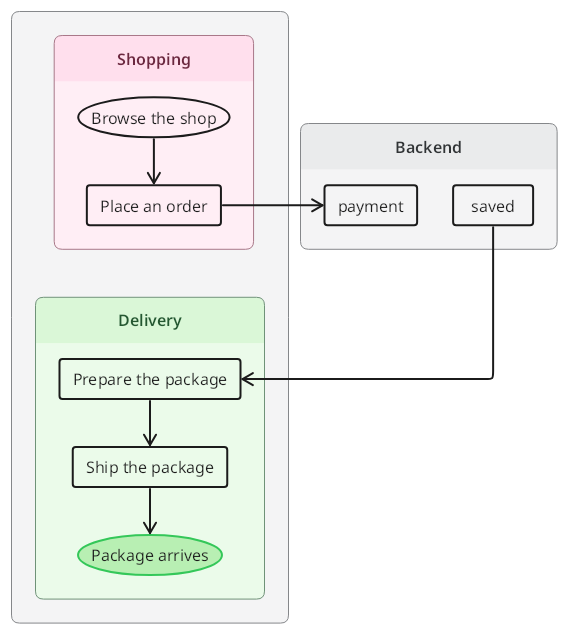
Preview unavailable in the current renderer. The source remains available to copy.
Here payment identifies the only node with that name, the member of Backend. checkout: Place an order updates the member of shopping without changing its group. Decorations and root connections may also precede the groups. Bare member lines and short node endpoints inside each group create that group’s local members.
Anonymous Nodes
To create a fresh node inline inside a connection, wrap its label in square brackets:
A -> [B]
C -> [B]
These two [B] occurrences create two distinct nodes even though they render the same label. Anonymous nodes do not create identifiers, cannot be declared on their own line, and cannot be referenced later by name.
If you need the same node to be reused across multiple connections, give it an identifier instead:
b: B
A -> b
C -> b
A single anonymous-node occurrence is still one node, so chained connections reuse that same inline node:
A -> [B] -> CThis creates one anonymous B node between A and C, not two. Style classes bind after the closing bracket:
A -> [B](dashed primary)The bracket text is rendered using the same inline label rules as any other node label.
Label Text and Line Breaks
A label is displayed inside its node. Use \n for a line break in node labels, anonymous node labels, group titles, or edge labels:
api: API\nServer
api -> [Save\nRecord] : write\nrequest
Styling
Node Styles
Styles are applied inline after the node identifier using parentheses:
a(fill primary dashed): AgentThe space-separated tokens select the node’s fill, color, and line style. See the Style Classes Reference for the available classes.
Token Binding Rule
Parentheses attached to a subject or arrow style that subject or edge. With no target, they style the containing scope:
- After a node or group token → styles on that token, as in
a -> b(dashed),group1(horizontal) { a }, anda -> [B](dashed) - After an arrow operator → edge styles:
->(bold) - Standalone statement → containing scope:
(horizontal)sets diagram direction at the root, or group direction inside a body.
Parentheses immediately after an arrow belong to the edge, including A ->(bold) { B }. To style that target group, use A -> { B }(horizontal) or name it: A -> D(horizontal) { B }.
In a chained connection like a -> b(dashed) -> c, (dashed) binds to b because b is the token right before it — so it is a node style, not an edge style.
Edge Labels
To label the arrow between two nodes, append : <label> to the connection:
a -> b : containsThis renders the word contains along the arrow. The label is trimmed of surrounding whitespace.
In a chained connection, the trailing label applies to the last edge in the chain:
a -> b -> c : dataThis labels the b → c edge with data. To label each edge, write separate connection lines:
a -> b : request
b -> c : forward
Edge Styles
Style classes can be applied to an edge by placing them in parentheses after the arrow:
a ->(bold primary) bThis makes the arrow bold with the primary color. Edge style tokens follow the same composable rules as node styles.
Node Declarations and Styles
Apply a style in a node’s label declaration or directly on a connection endpoint:
a(fill primary): Agent
a -> b(dashed)
b: Bias
Write node labels on their own declaration lines. A colon after a connection introduces an edge label:
a: Agent
b: Bias
a -> b : influences
Chained Connections
Multiple nodes can be chained in a single statement:
a -> b -> x <- yThis creates three edges: a → b, b → x, and y → x. Endpoint styles apply to each node in the chain; declare node labels separately.
Anonymous nodes follow the same chaining rule:
A -> [B] -> CThe single [B] occurrence is one node reused by both adjacent edges. Two separate [B] occurrences create two separate anonymous nodes.
Group endpoints follow the same occurrence rule. A -> { B } -> D creates one group reused by both outer edges. Each separate { ... } occurrence creates its own anonymous group. The outer arrows attach to the group boundary; the children remain inside it.
Line Types
At the document root, arrows (->, <-, <->, or --) distinguish connections from declarations. Group bodies contain connections, bare member identifiers, nested group blocks, standalone scope styles, and comments. Connections introduce node members directly. Separate node labels and targeted styles belong at the document root.
Declaration line — no arrow. The colon sets a display label:
a: Agent
a(fill primary): Agent
Connection line — has an arrow. A trailing colon without a following group body sets an edge label:
a -> b : contains
a -> b -> c : last edge labeled
Before a group body, : introduces the group's title, including in a connection endpoint: A -> D: Services {B}. Without a following body, a declaration's colon introduces a display label and a connection's trailing colon introduces an edge label. A group title and an edge label can coexist: A -> D: Services {B}: contains. A separate root declaration such as D: Services also changes a group title. Label the child on a root line such as B: Bee.
Comments
Comments use standard HTML/Markdown comment syntax and are ignored by the renderer:
<!-- this is a comment -->Grouping & Layout
Layout Classes
Set diagram direction with a standalone class list at the document root. Set a group's layout in its header or with a standalone class list inside its body:
(horizontal)
services(vertical): Services {
  api -> worker
}
api: API Server
worker: Worker
For an anonymous group, write its styles inside the body:
TextGraph source
{
  (horizontal)
  A -> B
}
Rendered diagram
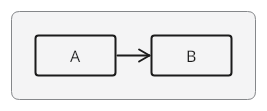
Preview unavailable in the current renderer. The source remains available to copy.
A standalone class list applies to its immediate containing scope, wherever it appears in the body. Group body classes merge with header classes, including appearance classes such as primary and dashed. They do not decorate child nodes or other groups. Nested groups collect their own scope styles. Conflicting layout directions remain a diagnostic rather than silently overriding one another.
(horizontal){A->B} remains valid, but it is two statements: (horizontal) sets the containing scope's direction and {A->B} defines an anonymous group. It has the same meaning as (horizontal) followed by a newline and {A->B}. The anonymous group receives no explicit direction from the preceding statement. A targetless style label, as in (horizontal): Services {A->B}, stays on the scope-style statement; it does not title the following group. Use a named header such as G(horizontal): Services {A->B} for a titled group.
| Class | Effect |
|---|---|
horizontal | Arrange left-to-right |
vertical | Arrange top-to-bottom |
layout-2-col | Arrange a group’s nodes in 2 columns |
layout-3-col | Arrange a group’s nodes in 3 columns |
layout-4-col | Arrange a group’s nodes in 4 columns |
layout-6-col | Arrange a group’s nodes in 6 columns |
Column layouts apply to groups containing nodes directly. Without an explicit layout class, the diagram is arranged automatically from its connections.
Membership
Curly braces declare containment. A group body contains connections, bare member identifiers, nested groups, standalone scope styles, and comments. Connections introduce their node members directly; separate node decorations belong at the document root:
platform {
  frontend(info): Frontend {
    browser
  }
  backend(primary): Backend {
    api -> worker
  }
}

browser -> api
browser: Browser
api: API Gateway
worker(fill success): Worker
A grouped connection needs no bare predeclarations. Each short node endpoint creates or reuses a member of the containing group. It never captures a node from another group, even when that node was declared first. Edge labels and inline endpoint or arrow styles work inside groups too:
Left(vertical) {
  A -> B : approval label
  C -> D : rejection label
}
A(ellipse): Request
B: Approved
C: Review
D: Rejected
A root connection may refer to any of these nodes without changing its group. Write cross-group connections at the root; qualified endpoints also let a grouped connection explicitly reference an existing node elsewhere. A short endpoint matching a declared local group refers to that group; if no local member matches, it may also refer to a uniquely named declared group elsewhere. Duplicated external group names need a prefix. Group references never change their parent. Inline group endpoints declare nested groups with their own members. Anonymous node occurrences in grouped connections belong to the containing group.
A node is a direct member of the group where its local name is introduced. It is also visually inside that group’s ancestors. Root references and qualified references never change that membership. Reordering groups or moving root references before them does not change which nodes exist or where they belong.
Repeating a name in one group identifies the same member. Using that name in another group creates a distinct member. Outside those groups, qualify the duplicated name:
frontend { api -> browser }
backend { api -> worker }
frontend.api -> backend.api
frontend.api: Browser API
backend.api: Service API
Named groups follow the same scope rules: different parents may contain groups with the same name. Declare a named group once within its parent. A node and a group cannot share a name in the same parent. Use a short group reference when unique, or qualify it when duplicated. A named group uses its identifier as the default title; use a header such as backend(primary): Services { or a separate root declaration backend: Services to change it.
An anonymous group omits the identifier: { member }. It has no default title or reusable name. Every separate anonymous group occurrence creates a distinct group. Empty named and anonymous groups are valid.
Groups as Connection Endpoints
Groups can be sources, targets, or intermediate endpoints. Their bodies support the same grouped connections and member declarations:
A -> services {
  B -> C
} -> D
services: Services
Both outer edges attach to the boundary of one services group. The grouped connection B -> C introduces and connects its children. A group endpoint never expands into external arrows to each member.
Whitespace around braces and arrows is optional: A->{B}->D is valid. Put multiple members on separate lines. A -> {} -> {} contains two distinct empty anonymous groups. Nested groups may also appear inside an inline group body.
A group header may include a title in both standalone and endpoint forms: D: Services {B} and A -> D: Services {B}. The opening brace ends the title and starts the body; the body may stay on that line or continue on following lines. Labels do not support literal curly braces, quoting them, or escaping them. An unclosed group is a syntax error and never becomes ordinary label text.
Short and Qualified References
At the document root, a unique short name reaches a node or group at any depth. The renderer collects group members before resolving root references, so these connections and decorations may precede the groups:
checkout -> payment
payment(fill success): Take payment

Shopping {
  checkout
}
Backend {
  payment
}
payment and Backend.payment both reference the same member here. If no node or group has a root short reference’s name, that reference introduces an ungrouped node. A qualified reference must identify an existing node or group; it never creates a missing path.
When several subjects have the same short name, a root reference using only that name is ambiguous. Add enough trailing group names to identify one subject. For example, when platform contains frontend { api } and backend { api }, use frontend.api and backend.api; the full paths platform.frontend.api and platform.backend.api also work. If frontend itself appears under multiple parents, include the next parent name as needed.
A qualified reference first matches a complete path from the document root, then tries unique trailing paths. With Left { A } and Outer { Left { A } }, Left.A selects the top-level member and Outer.Left.A selects the nested member. The short names A and Left remain ambiguous at the root.
Inside a group, short node names always refer to that group’s local members. Group1 { node1 } followed by Group2 { node1 -> node2 } creates Group1.node1, Group2.node1, and Group2.node2, in either declaration order. Use Group1.node1 explicitly when a grouped connection should reach the other node. Group declaration headers and bare member lines use simple local identifiers, not qualified paths.