DrawMotive editor
@drawmotive/editor embeds a visual diagram editor in your web application. Start with TextGraph or an empty canvas, edit shapes, labels and connections, then save an editable document or export PNG/SVG. The public editor runs in the browser without an account or rendering service.
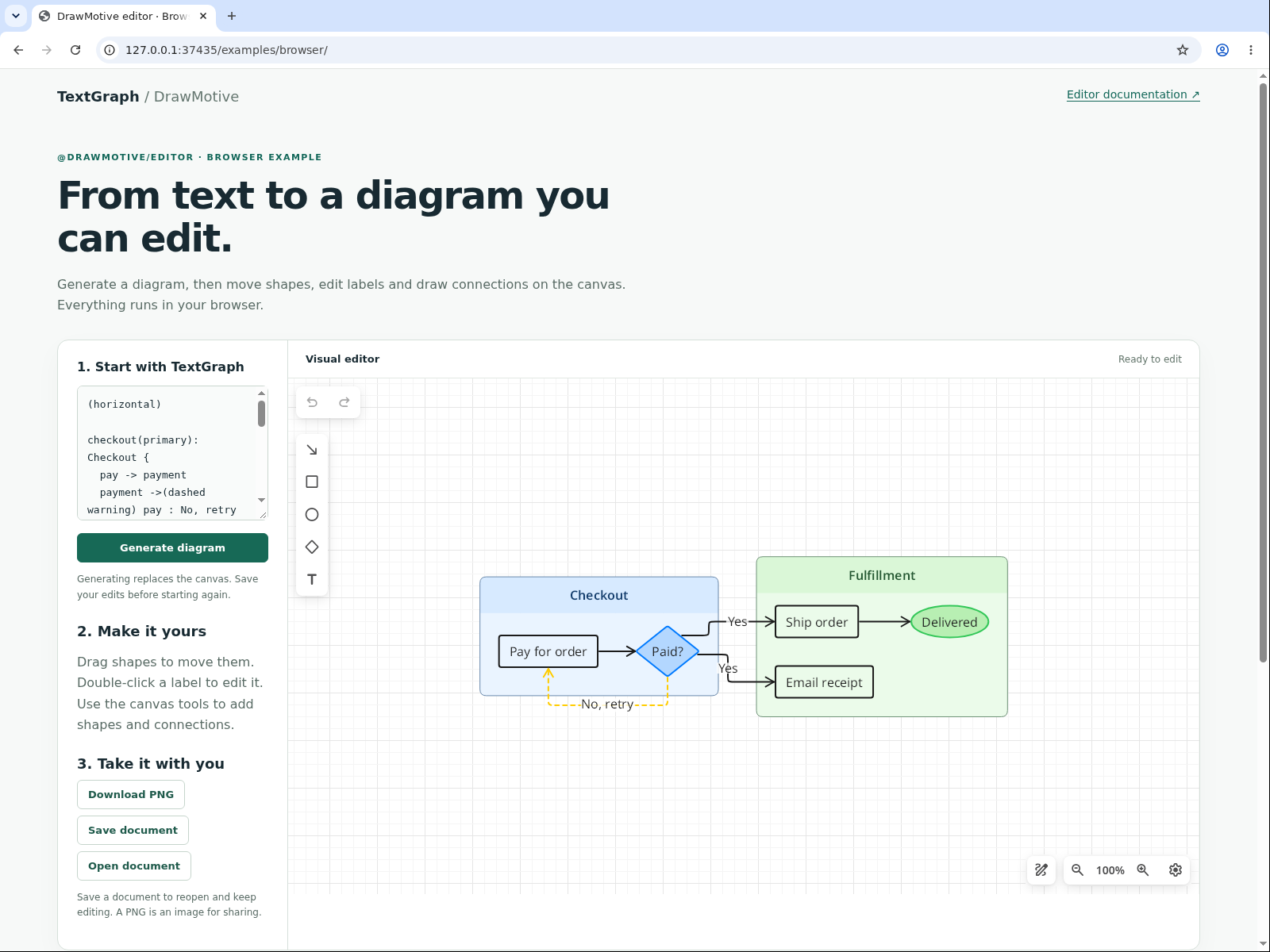
Run the visual editor SDK demo →
From TextGraph to visual editing
The Playground previews an image as you edit TextGraph. DrawMotive creates a separate editable document from that source, then lets people work directly with its shapes, labels and connections. This is intentionally a one-way workflow: canvas changes belong to the saved document and do not rewrite TextGraph. Generating from source again replaces the document; it does not merge with earlier canvas edits.
| What you need | Package |
|---|---|
| Validate TextGraph and render PNG/SVG in a browser, Node.js or a Worker; render PNG in React | @drawmotive/textgraph |
| Edit diagrams visually and save editable documents in a web page | @drawmotive/editor |
Install and create
npm install @drawmotive/[email protected]
npx drawmotive-copy-assets public/editor
Copy the complete runtime again after each upgrade. For Vite, run the copy command in predev and prebuild. Serve the application over HTTPS or localhost.
<div id="editor" style="height: 600px"></div>import { createEditor } from '@drawmotive/editor';
const editor = await createEditor({
container: document.querySelector('#editor'),
assetBaseUrl: '/editor/',
});
await editor.replaceTextGraph('User -> Application -> Database');
await editor.fitViewport();Creation resolves when the empty scene and temporary storage are ready. Replacement and viewport fitting are separate operations. To start with a blank canvas, omit the two calls after creation. Each instance owns an iframe and browser runtime; give its container an explicit height. Mount only the instances your application needs.
Save, reopen and export
const snapshot = await editor.exportSnapshot({ formats: ['raw', 'png', 'svg'] });

// Persist snapshot.raw in your application's storage.
await editor.replaceDocument(snapshot.raw);
await editor.fitViewport();

// PNG is an object; its base64 property contains the image bytes.
const imageUrl = `data:image/png;base64,${snapshot.png.base64}`;
const svgText = snapshot.svg;
All requested formats come from one document revision. raw is an opaque base64 editable document, not TextGraph source. PNG contains base64, pixel width/height, scale, and logical displayWidth/displayHeight; SVG is a string. Raw-only export does not render an image. Rendering defaults to scale: 1 and padding: 10; set render: { scale, maxWidth, padding } when exporting to change those options.
Your application owns durable saving. Runtime IndexedDB is temporary and deleted during disposal. Exporting a snapshot does not mark it saved.
An editable PNG
To keep the drawing and its preview in one file, embed the document explicitly:
const snapshot = await editor.exportSnapshot({
  formats: ['png'],
  render: { scale: 2, maxWidth: 1920, padding: 10 },
  png: { embedDocument: true },
});

// Persist the complete PNG bytes, then reopen their base64 representation.
await editor.replacePngDocument(snapshot.png.base64);
await editor.fitViewport();
embedDocument defaults to false. Ordinary PNG and SVG exports are images; preserve raw or use an embedded PNG to reopen canvas edits. Ordinary PNGs without an embedded document and damaged imports are rejected without clearing the current drawing.
Replace a diagram
await editor.replaceTextGraph('Draft -> Review -> Approved');
await editor.fitViewport();

// Explicitly start a new empty document when needed.
await editor.clearDocument();
Successful replacements reset selection and undo history. Save canvas edits before replacing a document. Invalid imports preserve it. An unfinished gesture or text edit reports EditorBusy; finish or cancel that interaction before trying again.
State and host controls
Subscribe to state when your host needs save indicators, history controls or close confirmation:
let savedRevision = null;
function showSaveState(state) {
  const dirty = state.revision !== null && state.revision !== savedRevision;
  // Update your host UI from dirty, busy, health, canUndo and canRedo.
}
const unsubscribe = editor.onStateChanged(showSaveState);

async function saveDocument() {
  const snapshot = await editor.exportSnapshot({ formats: ['raw'] });
  await persistDocument(snapshot.raw); // Your application's storage operation.
  savedRevision = snapshot.revision;
  showSaveState(await editor.getState());
}
State subscriptions immediately receive the current state. Revisions are opaque and local to an instance. Compare the current revision with the revision whose save completed: an older save acknowledgment must not clear later edits. Selection, zoom and pan do not change the document revision. The host decides whether its initial empty document needs saving.
Use ui.buttons at creation to change built-in button visibility, and ui.actions for host-owned actions such as Save or Publish. Action handlers remain in the parent and can call the editor's export methods. setActionState() updates their label, visibility and enabled state. undo(), redo() and setEditingEnabled() are also public operations. See the package API guide for a complete host-action example.
Lifecycle and failures
Create the editor after your framework mounts its container. signal cancels startup; after creation, explicitly release subscriptions and dispose the instance when the component unmounts:
const controller = new AbortController();
const editor = await createEditor({
  container,
  assetBaseUrl: '/editor/',
  signal: controller.signal,
});

// On component teardown, release any state subscription as well.
await editor.dispose();
Call the function returned by onStateChanged() to unsubscribe. The module can be imported during server rendering; creation requires browser DOM, Web Crypto and MessageChannel. Startup and request deadlines are separate: startupTimeoutMs and requestTimeoutMs each default to 120000. disposeTimeoutMs defaults to 5000.
A request deadline reports RequestTimeoutUnknown with a completion promise for its eventual result. Do not automatically repeat a mutation whose outcome is unknown. A failed local transaction can report health: 'faulted' and revision: null; a successful explicit document replacement restores the instance. External storage failures remain the host's responsibility. Disposal removes the iframe even when storage cleanup cannot be confirmed; in that case it rejects with DisposeCleanupUnconfirmed.
Hosting and supported scope
Set assetBaseUrl to the copied runtime directory, including any deployment prefix, such as /my-app/editor/. Serve .wasm as application/wasm and deploy all copied files, including licenses and notices. Do not remove or rewrite runtime files: startup verifies their hashes.
For a restrictive Content Security Policy, allow the runtime frame from its asset origin, WebAssembly execution (wasm-unsafe-eval), its own static resources and inline styles. Advanced hosts with authenticated asset transport can use frameDocument; see the package guide.
The public build provides local editing. Optional analytics, authentication and remote-sync modules default to false; enabling a module absent from that build fails explicitly. Files, accounts, persistence and product actions belong to the host. Current Chromium is the verified visual-runtime target; Firefox/WebKit, mobile devices and embedded hosts require their own verification.
The package README and TypeScript declarations define the full 0.3.0 API. Upgrade SDK code and copied runtime assets together.