Choose your workflow
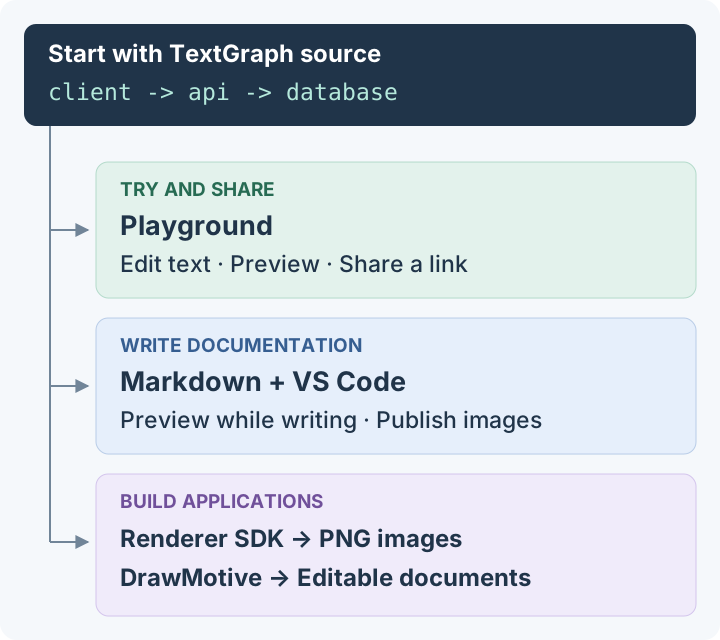
Learn TextGraph once, then use its source wherever you work. Start with the Playground, bring diagrams into your documentation, or build rendering and visual editing into an application.
Try and share a diagram
The Playground is the place to write TextGraph and see a live preview. Zoom, download the PNG, or share a link containing the source. There is nothing to install.
To start from a description, use the AI tools prompt, then check the generated source in the Playground. The guide links the Markdown references an AI tool needs.
Write documentation
Put a fenced textgraph block in a Markdown file. The VS Code extension previews it while you write; the Markdown & VitePress plugin renders it into a static image when you publish. Both use the same diagram source.
Build an application
| What people need to do | Use | What you keep |
|---|---|---|
| Render diagrams from text in a browser, Worker or Node.js; render PNG in React | JavaScript SDK, @drawmotive/textgraph | TextGraph source and PNG/SVG output |
| Move shapes, edit labels and draw on a canvas | DrawMotive editor, @drawmotive/editor | An editable document, optional PNG/SVG images, or a PNG with its document embedded |
| Render images over HTTP on your own infrastructure | Docker renderer | TextGraph source and PNG/SVG output |
The editor intentionally uses a one-way workflow from text to visual editing. Save its document to keep canvas changes. Generating from TextGraph again replaces the document; it does not merge canvas edits or rewrite the source.
Where the SDK demos fit
The renderer demo is a small, runnable implementation of the JavaScript guide. The visual editor demo demonstrates embedding the editor and saving a document. They are companion code examples for application developers. For everyday text editing and sharing, use the Playground.