JavaScript / Node.js
Use @drawmotive/textgraph to validate TextGraph source and render PNG or SVG images. It runs locally in modern browsers, module workers, and Node.js 22. TypeScript declarations are included.
The demo is a minimal integration you can inspect and reuse: source goes into the SDK, and a PNG comes out. For writing and sharing diagrams, use the Playground. For moving shapes and editing labels on a canvas, continue to the DrawMotive editor.
From source to PNG
This is the source used by the browser quick start below, with its actual output:
TextGraph source
browser -> api -> database
api(fill primary): API server
Rendered diagram
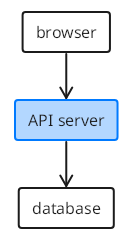
Preview unavailable in the current renderer. The source remains available to copy.
Your application supplies the text, calls renderPng(), and displays or saves the returned image. The image itself is not an editable canvas.
Install
npm install @drawmotive/[email protected]Browser quick start
In a bundled application such as Vite, copy the package runtime into your public directory before development and production builds:
npx textgraph-copy-assets public/textgraph/wasmThis includes WebAssembly, runtime modules, fonts, themes, and licenses. Copy again after updating the SDK. Serve the application over HTTPS or localhost; opening an HTML file with file:// does not work.
Add an image and a diagnostic message to the page:
<img id="diagram" alt="Browser connects to an API server and database">
<p id="message" role="status"></p>
Then render the source from your JavaScript entry:
import { initializeTextGraph } from '@drawmotive/textgraph/browser';

const graph = await initializeTextGraph({
  resolveAsset: asset =>
    new URL(`/textgraph/${asset.path}`, location.origin),
});

try {
  const result = await graph.renderPng(
    'browser -> api -> database\napi(fill primary): API server',
    { encoding: 'base64', scale: 2, maxWidth: 1600 },
  );
  if (result.success) {
    const image = document.querySelector('#diagram');
    image.src = `data:image/png;base64,${result.png}`;
    image.width = result.displayWidth ?? result.width / 2;
    image.height = result.displayHeight ?? result.height / 2;
    image.style.maxWidth = '100%';
    image.style.height = 'auto';
  }
  document.querySelector('#message').textContent =
    result.diagnostics.map(diagnostic => diagnostic.message).join('\n');
} finally {
  await graph.dispose();
}
The asset URL must match your deployment path. For a site mounted at /my-app/, use /my-app/textgraph/${asset.path}. asset.path already begins with wasm/.
Reuse one initialized instance for repeated renders and call dispose() when the component is removed. Scale controls raster density; displayWidth and displayHeight provide logical display dimensions. The example above disposes after its single render. Operational failures such as missing runtime assets throw; catch them in your application to show a retry message. Invalid diagram source returns success: false with diagnostics.
Plain HTML without a bundler
The live example uses native ES modules. Its build copies the installed package's src/, generated/wasm-manifest.js, and LICENSE together into /textgraph/sdk/, preserving relative imports. Its JavaScript imports /textgraph/sdk/src/platform/browser.js and resolves runtime files from /textgraph/wasm/.
See the complete example source and the asset preparation script. These files use the public npm package; no sibling DrawMotive repository or CDN is required.
Module workers and React
Import initializeTextGraph from @drawmotive/textgraph/worker inside a module worker to keep initialization and rendering off the page's main thread. Use the same resolveAsset mapping and send the resulting PNG bytes back to the page.
React 18.2+ and 19 applications can use the optional @drawmotive/textgraph/react entry:
import { TextGraph, TextGraphProvider } from '@drawmotive/textgraph/react';

const options = {
  resolveAsset: asset =>
    new URL(`/textgraph/${asset.path}`, location.origin),
};

export function App() {
  return (
    <TextGraphProvider options={options}>
      <TextGraph source="A -> B" alt="A connects to B" />
    </TextGraphProvider>
  );
}
The provider shares a runtime and disposes it on unmount. Source changes update the image. Copy the browser runtime assets as described above. React is optional for applications using the base SDK.
Node.js quick start
Node.js loads runtime assets directly from the installed package. Save this as render.mjs and run node render.mjs:
import { writeFile } from 'node:fs/promises';
import { initializeTextGraph } from '@drawmotive/textgraph/node';

const graph = await initializeTextGraph();
try {
  const result = await graph.renderPng('A -> B');
  if (!result.success) {
    throw new Error(result.diagnostics.map(item => item.message).join('\n'));
  }
  await writeFile('diagram.png', result.png);
} finally {
  await graph.dispose();
}
PNG output defaults to bytes, scale 1, padding 10, and a white background. Validate source without rendering with await graph.validate('A -> B'); the result contains valid and diagnostics.
For vector output, call renderSvg() on the same initialized instance, before disposing it:
const vector = await graph.renderSvg('A -> B', { padding: 10 });
if (vector.success) {
  await writeFile('diagram.svg', vector.svg, 'utf8');
}
Browser and Worker instances also expose renderSvg(). It returns SVG text and logical displayWidth/displayHeight; raster options such as scale apply only to PNG. The React component, Markdown plugin and Playground continue to display PNG.
See the SDK API reference for options, cancellation, and diagnostic fields, or the runnable package samples for browser, worker, React, and Node applications.