What is TextGraph?
TextGraph turns readable text into flowcharts and directed graphs. Describe nodes and their relationships; TextGraph draws the connections and arranges the diagram for you.
From relationships to a diagram
Three names and two arrows describe a request moving from a client to an API and on to a database. The image beside the source is rendered by TextGraph.
TextGraph source
client -> api -> databaseRendered diagram
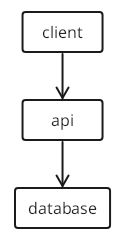
Preview unavailable in the current renderer. The source remains available to copy.
The source describes what connects to what. Automatic layout decides where the nodes go. Change the text when the relationships change, and render again.
Add detail as you need it
Give nodes readable labels and use style classes to highlight their roles. The connections stay the same:
TextGraph source
client -> api -> database

client: Browser
api(fill primary): API server
database: Database
Rendered diagram
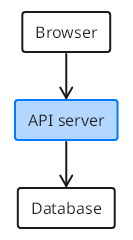
Preview unavailable in the current renderer. The source remains available to copy.
Groups organize related nodes, while layout classes control direction and columns. The Getting Started guide builds these ideas one at a time; Flowcharts explores them in depth.
Take the diagram into your workflow
Start in the Playground to edit source and see the result without installing anything. Use the same text in Markdown documentation or a VS Code preview.
When building an application, the JavaScript SDK turns source into PNG or SVG images. To let people move shapes and edit labels on a canvas, use the DrawMotive editor. Its one-way workflow starts from TextGraph and saves a separate editable document. Canvas edits belong to that document; generating from TextGraph again replaces it.
Follow the sidebar from Learn TextGraph, through Use TextGraph, to Build applications. Choose your workflow compares the tools, and Reference holds the detailed language rules.