VS Code Extension
Install TextGraph Markdown in VS Code 1.101 or later. The stable extension version 0.3.0 bundles TextGraph SDK 0.3.0.
Open a Markdown file containing a textgraph fenced block, then run Markdown: Open Preview to the Side. Diagrams render locally in the built-in preview and refresh as the source changes.
Write on the left, preview on the right
The example below pairs a Markdown block with its real rendered output. In VS Code, the built-in Markdown preview displays the diagram beside your file.
Markdown source
```textgraph
write -> preview -> revise
preview(fill primary): See the diagram
```
Rendered diagram
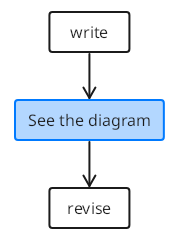
Preview unavailable in the current renderer. The source remains available to copy.
Change a label or add an arrow in the file; the preview refreshes. This is a preview of the text, so changes are made in the Markdown file. For editing shapes directly, use the DrawMotive editor.
In Restricted Mode, diagrams remain source code until the workspace is trusted. Invalid syntax appears as an error next to the source; correcting it lets rendering resume.
When the file is ready to publish, use the Markdown & VitePress plugin to render the same fenced blocks on your site.