Markdown and VitePress
TextGraph diagrams can be rendered when Markdown is built, so readers receive a static image. This page uses the Markdown plugin and the public TextGraph SDK.
From a Markdown file to a published diagram
Write a fenced block in your Markdown file. When the documentation is built, the block becomes the image shown beside it.
Markdown source
```textgraph
draft -> review -> publish
publish(fill success): Published
```
Rendered diagram
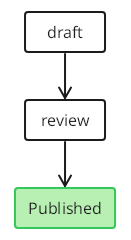
Preview unavailable in the current renderer. The source remains available to copy.
Readers receive a static PNG; they do not need the renderer in their browser. To see the diagram while writing, use the VS Code extension.
Install
Install the Markdown plugin, which uses TextGraph SDK 0.3.0:
npm install @drawmotive/[email protected] markdown-it@14VitePress
Use Node.js 22.12.0 or later and VitePress 2.0.0-alpha.19.
import { defineConfig } from 'vitepress'
import { withTextGraph } from '@drawmotive/markdown-it-textgraph/vitepress'

export default defineConfig(withTextGraph({
  title: 'Documentation',
}))
Development displays syntax errors next to the source. Production builds fail on invalid diagrams. VitePress serves content-addressed PNG assets that remain visible without JavaScript and work with img-src 'self'. Plain markdown-it embeds PNG data URLs and requires img-src data:. PNG rendering defaults to scale 1; set render: { scale: 2 } in the adapter options for higher raster density at the same logical display size.
markdown-it
import MarkdownIt from 'markdown-it'
import { createTextGraphMarkdown } from '@drawmotive/markdown-it-textgraph'

const md = new MarkdownIt()
const diagrams = createTextGraphMarkdown()
md.use(diagrams.markdownIt)
try {
  const html = await diagrams.render(md, '```textgraph\nA -> B\n```')
  console.log(html)
} finally {
  await diagrams.dispose()
}
Use the asynchronous entry to generate diagrams. A direct synchronous md.render() call preserves the original code block.