AI tools
Describe the relationships you want to show, and ask an AI tool to write TextGraph. Paste the result into the Playground to check the diagram, then refine the text or use it in your documentation. No skill installation is required.
Copy this prompt
Replace the last line with your own description:
Create a TextGraph diagram for the description below.
Read https://textgraph.dev/reference/textgraph-spec.md first.
Also read https://textgraph.dev/reference/syntax-cases.md for precedence and syntax limits.
If styling is requested, also read https://textgraph.dev/reference/classes.md.
If you cannot read a reference, ask me to attach it before generating.
Use only documented syntax and classes. Keep node labels on separate
declaration lines and preserve the described relationships.
Return only the diagram source, without Markdown fences or explanation.

Description: A browser sends requests to an API, which queries a database.
If your tool cannot open links, download and attach the Language Specification Markdown and Syntax Cases Markdown. For styling, also attach the Style Classes Markdown. These are the same sources used by the reference pages.
What the result looks like
For the description in the prompt, a valid result is:
TextGraph source
browser -> api : requests
api -> database : queries

browser: Browser
api: API
database: Database
Rendered diagram
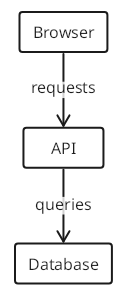
Preview unavailable in the current renderer. The source remains available to copy.
Check that the preview matches your intended relationships. If the Playground reports an error, give the AI tool the source and diagnostic and ask it to correct the diagram. For Markdown, wrap the final source in a fenced block with the language textgraph.
For syntax or reference errors, the Playground also offers Fix It. Choosing it sends the current source to the disclosed Azure AI repair service. Review the proposed source changes and preview, then choose Replace original DSL or Discard. Normal rendering stays in the browser; the repair flow does not generate a diagram from unrestricted prose.
Which references are needed?
| Reference | Include it in the prompt? |
|---|---|
| Language Specification | Yes. It covers connections, labels, groups, scoped names, short and qualified references, and layout syntax. |
| Syntax Cases and Precedence | Yes. It explains group-before-label precedence, reserved braces, style binding, and examples that are easy to misread. |
| Syntax Reference | Not needed alongside the specification; it is a shorter summary of the same syntax. |
| Style Classes | Include it when requesting shapes, colors, fills or line styles. The specification explains how classes bind, but delegates the available classes to this reference. |
For a plain diagram, use the specification and syntax cases. The prompt reads the style catalog only when needed. The same prompt and references can later be packaged into a reusable skill.