Flowcharts
Describe nodes and their connections to create a flowchart or directed graph. No diagram-type declaration is needed.
All examples on this page use cloud architecture as the running context.
Each runnable example pairs its TextGraph source with a rendered diagram. On narrow screens, the diagram appears below the source.
Your First Flowchart
Three identifiers and two arrows produce a complete diagram.
TextGraph source
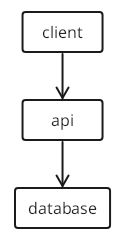
client -> api -> databaseRendered diagram
Preview unavailable in the current renderer. The source remains available to copy.
Each identifier becomes a node labeled with its own name. The -> operator draws a directed edge. TextGraph arranges the nodes automatically.
Node Labels
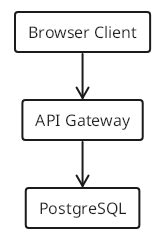
By default, a node displays its identifier as its label. To assign a human-readable name, declare a label on a separate line with id: Label.
Build the diagram structure first, then name the nodes. This keeps you focused on relationships before cosmetics.
TextGraph source
client -> api -> db

client: Browser Client
api: API Gateway
db: PostgreSQL
Rendered diagram
Preview unavailable in the current renderer. The source remains available to copy.
Labels can appear before or after the connections that reference them — the renderer collects all declarations before layout. Both orderings are equivalent. This page uses the connections-first style throughout.
Labels cannot appear inline on a connection line. This is invalid:
<!-- invalid -->
client: Browser Client -> api: API Gateway
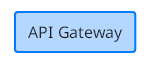
Style and label can be combined on a single standalone line:
TextGraph source
api(fill primary): API GatewayRendered diagram
Preview unavailable in the current renderer. The source remains available to copy.
Connection Types
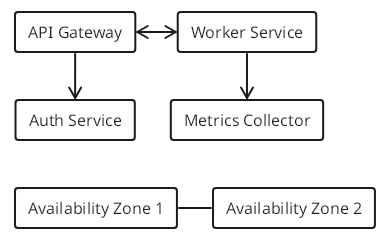
TextGraph supports four connection types.
| Syntax | Meaning |
|---|---|
a -> b | a points to b |
a <- b | b points to a |
a <-> b | Bidirectional |
a -- b | Undirected (no arrowhead) |
TextGraph source
<!-- directed: gateway sends requests to auth -->
gateway -> auth

<!-- reverse: metrics pulls data from worker -->
metrics <- worker

<!-- bidirectional: mutual event subscriptions -->
gateway <-> worker

<!-- undirected: peer availability zones -->
az1 -- az2

gateway: API Gateway
auth: Auth Service
metrics: Metrics Collector
worker: Worker Service
az1: Availability Zone 1
az2: Availability Zone 2
Rendered diagram
Preview unavailable in the current renderer. The source remains available to copy.
Edge Labels
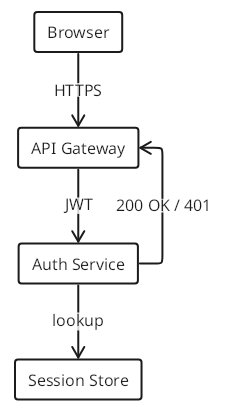
Append : label after a connection to annotate the edge.
TextGraph source
client -> gateway : HTTPS
gateway -> auth : JWT
auth -> db : lookup
auth -> gateway : 200 OK / 401

client: Browser
gateway: API Gateway
auth: Auth Service
db: Session Store
Rendered diagram
Preview unavailable in the current renderer. The source remains available to copy.
Edge labels describe protocols, data formats, or outcomes. The label text is trimmed of surrounding whitespace.
Chained Connections
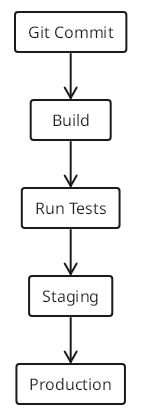
Chain multiple nodes in a single statement. Each -> creates one edge.
TextGraph source
commit -> build -> test -> stage -> prod

commit: Git Commit
build: Build
test: Run Tests
stage: Staging
prod: Production
Rendered diagram
Preview unavailable in the current renderer. The source remains available to copy.
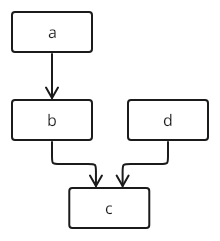
Mixed directions work in chains:
TextGraph source
a -> b -> c <- dRendered diagram
Preview unavailable in the current renderer. The source remains available to copy.
This creates three edges: a -> b, b -> c, and d -> c.
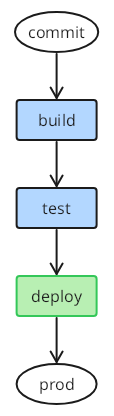
Inline styles apply per node in a chain:
TextGraph source
commit(circle) -> build(fill) -> test(fill) -> deploy(fill success) -> prod(ellipse)Rendered diagram
Preview unavailable in the current renderer. The source remains available to copy.
Node Shapes
Shapes map to standard flowchart conventions. Apply a shape class in parentheses after the node identifier.
| Class | Convention |
|---|---|
rectangle | Process / action (default) |
circle | Start / end / event |
ellipse | Start / end |
diamond | Decision / branch |
TextGraph source
start -> check
check -> build : yes
check -> fail : no
build -> artifact
build -> db : read config
build -> api

start(circle): Deploy
check(diamond): Tests pass?
build: Build Image
artifact: Release Notes
db: Config Store
api(ellipse): Live API
fail(circle danger): Abort
Rendered diagram
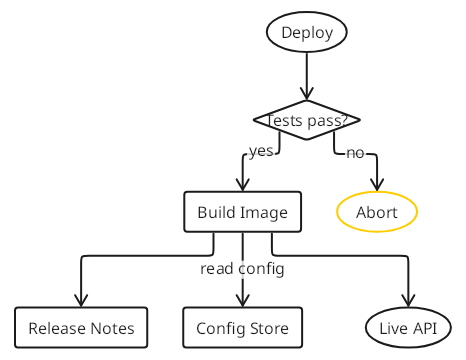
Preview unavailable in the current renderer. The source remains available to copy.
Styling Nodes
Fill and Colors
The fill class fills a node with the primary fill color. Combine with a color class to set a specific fill color.
TextGraph source
api(fill): Default Fill
auth(fill primary): Primary
cache(fill info): Info
ok(fill success): Healthy
degraded(fill warning): Degraded
down(fill danger): Down
Rendered diagram
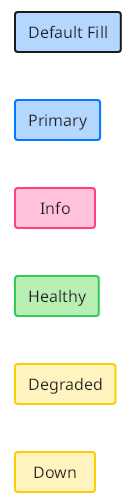
Preview unavailable in the current renderer. The source remains available to copy.
Semantic colors — primary, secondary, info, success, warning, danger — carry meaning.
TextGraph source
<!-- service health dashboard -->
web -> api -> queue
api -> db
api -> cache

web(fill success): Web Server
api(fill success): API Server
queue(fill warning): Message Queue
db(fill danger): Database
cache(fill info): Cache Layer
Rendered diagram
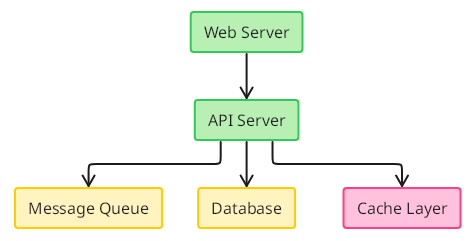
Preview unavailable in the current renderer. The source remains available to copy.
Border Styles
Use line style classes for node borders.
| Class | Effect |
|---|---|
dashed | Dashed line |
dotted | Dotted line |
TextGraph source
live -> preview : promote
preview -> legacy : replace

live: Production
preview(dashed): Staging
legacy(dotted): Deprecated
Rendered diagram
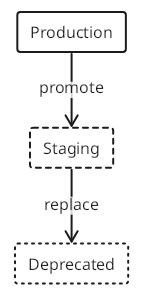
Preview unavailable in the current renderer. The source remains available to copy.
Line Weight
| Class | Effect |
|---|---|
bold | Heavy stroke |
TextGraph source
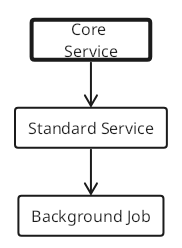
critical -> standard -> minor

critical(bold): Core Service
standard: Standard Service
minor: Background Job
Rendered diagram
Preview unavailable in the current renderer. The source remains available to copy.
Styling Edges
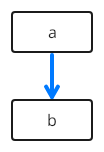
Apply style classes to an edge by placing them in parentheses after the arrow operator.
TextGraph source
a ->(bold primary) bRendered diagram
Preview unavailable in the current renderer. The source remains available to copy.
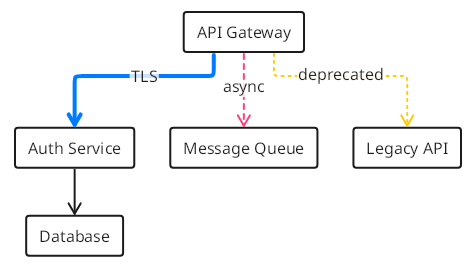
Edge styles follow the same composable rules as node styles. Color, line style, and weight classes all work on edges.
TextGraph source
<!-- encrypted traffic: bold primary -->
gateway ->(bold primary) auth : TLS

<!-- async messaging: dashed info -->
gateway ->(dashed info) queue : async

<!-- deprecated path: dotted danger -->
gateway ->(dotted danger) legacy : deprecated

<!-- standard connection -->
auth -> db

gateway: API Gateway
auth: Auth Service
queue: Message Queue
legacy: Legacy API
db: Database
Rendered diagram
Preview unavailable in the current renderer. The source remains available to copy.
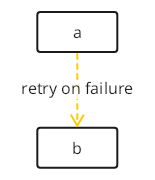
Combine edge style and edge label in one statement:
TextGraph source
a ->(dashed warning) b : retry on failureRendered diagram
Preview unavailable in the current renderer. The source remains available to copy.
Line Breaks
Use \n inside a label to split it across lines.
TextGraph source
api: API Gateway\nPort 8080Rendered diagram
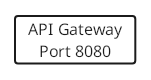
Preview unavailable in the current renderer. The source remains available to copy.
Embedded TextGraph Blocks
In a Markdown file, put the diagram inside a fenced code block with the language textgraph:
```textgraph
client -> gateway -> auth -> db
```
Render it with the Markdown & VitePress plugin or preview it with the VS Code extension. In the Playground, paste only the diagram source inside the fence.
Groups and Scopes
Curly braces declare group membership. Group bodies contain connections, bare member names, nested groups, standalone scope styles, and comments. A standalone class list such as (horizontal) styles its immediate containing group. A connection inside a group creates or reuses local node members directly; put cross-group connections and separate node decorations at the document root.
TextGraph source
frontend {
  browser -> cdn
}
backend {
  api -> auth
  api -> worker
}
data {
  db -- cache
}

cdn -> api
api -> db
api -> cache

browser: Browser
cdn: CDN
api: API Gateway
auth: Auth Service
worker: Worker
db: PostgreSQL
cache: Redis
Rendered diagram
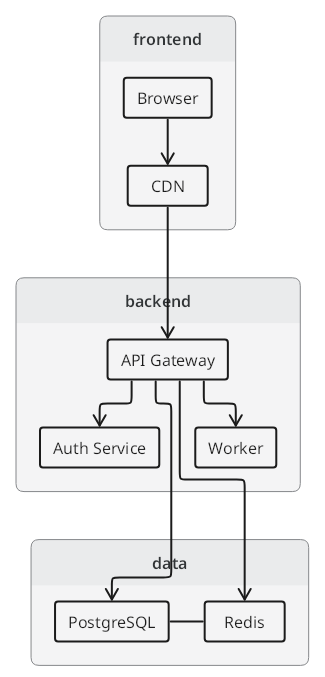
Preview unavailable in the current renderer. The source remains available to copy.
At the root, connections use short names when they are unique across the diagram. Add a group prefix only when needed to distinguish duplicated names. Moving a root connection or decoration before or after the groups leaves membership unchanged.
Named and Styled Groups
A named group uses its identifier as its default title. Combine a group’s styles and title in its header:
TextGraph source
frontend(fill info): Frontend {
  browser -> cdn
}
backend(fill primary): Backend {
  api -> worker
}

cdn -> api
browser: Browser
cdn: CDN
api: API Server
worker: Worker
Rendered diagram
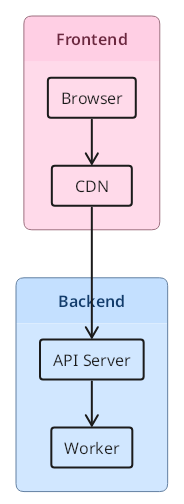
Preview unavailable in the current renderer. The source remains available to copy.
A group can also have its title declared separately at the root:
TextGraph source
frontend(fill info) {
  browser -> cdn
}
frontend: Frontend
browser: Browser
cdn: CDN
Rendered diagram
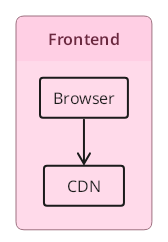
Preview unavailable in the current renderer. The source remains available to copy.
Declare each named group once in its parent. Different parents may contain groups with the same name. Use a unique short name or a qualified path in root connections or decorations. A node and a group cannot share a name in the same parent.
Anonymous Groups
Omit the group name for an anonymous group with no default visible title. Separate anonymous group occurrences create distinct groups. Empty groups are valid too.
TextGraph source
{
  a -> b
}
a: Service A
b: Service B
Rendered diagram
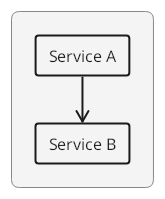
Preview unavailable in the current renderer. The source remains available to copy.
Groups in Connections
Define a group directly at either end of an arrow, including an empty group:
TextGraph source
A -> { B }
A -> {}
{ C } -> D
Rendered diagram
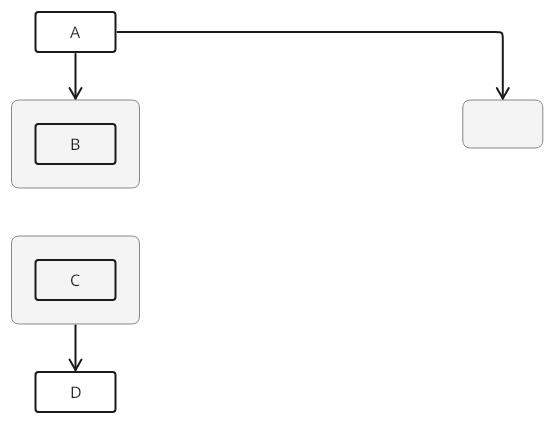
Preview unavailable in the current renderer. The source remains available to copy.
The outer connection attaches to the group boundary. A member never becomes a list of external targets. Spaces are optional: A->{B} is valid. Put multiple members on separate lines.
Groups can be named or chained:
TextGraph source
A -> services {
  B -> C
} -> D
services: Services

E -> { F } -> G
Rendered diagram
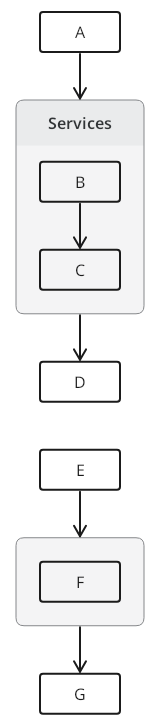
Preview unavailable in the current renderer. The source remains available to copy.
The first chain uses one named group, titled Services, for both outer arrows. The grouped connection introduces B and C and connects them inside it. The second chain uses one anonymous group between E and G.
Use parentheses for styles as usual:
TextGraph source
{
  (horizontal)
  B
} -> A
Rendered diagram
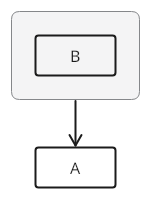
Preview unavailable in the current renderer. The source remains available to copy.
TextGraph source
A -> services(horizontal) { B }Rendered diagram
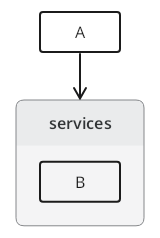
Preview unavailable in the current renderer. The source remains available to copy.
TextGraph source
A ->(bold) { B }(horizontal)Rendered diagram
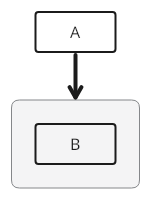
Preview unavailable in the current renderer. The source remains available to copy.
In the last example, bold styles the edge because it follows the arrow; horizontal styles the group because it follows the closing brace.
Nested Groups
Groups can nest. Each group has independent layout. Unique short names still work from the root, even for deeply nested members:
TextGraph source
platform {
  frontend {
    app
  }
  backend {
    api
    services {
      auth
      billing
    }
  }
}

app -> api
api -> auth
api -> billing
app: Web App
api: API
auth: Auth
billing: Billing
Rendered diagram
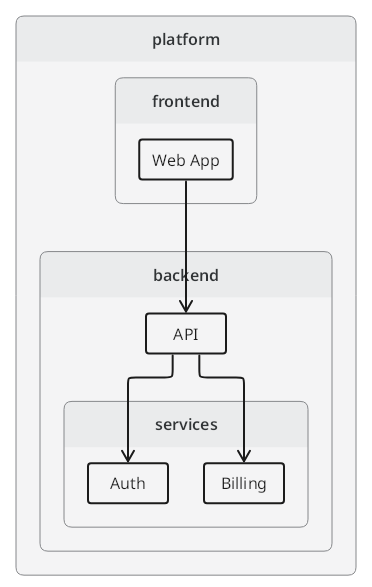
Preview unavailable in the current renderer. The source remains available to copy.
Layout Control
Layout classes control how children are arranged within a group.
| Class | Effect |
|---|---|
vertical | Top-to-bottom (default) |
horizontal | Left-to-right |
layout-2-col | Two-column grid |
layout-3-col | Three-column grid |
layout-4-col | Four-column grid |
layout-6-col | Six-column grid |
Set direction on the group header:
TextGraph source
services(horizontal) {
  api -> auth -> worker
}
Rendered diagram
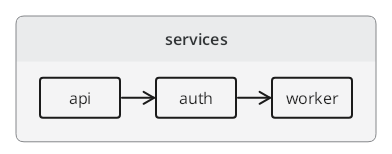
Preview unavailable in the current renderer. The source remains available to copy.
For the whole diagram, place (horizontal) or (vertical) at the start of the source.
Use a column grid on a group of nodes:
TextGraph source
metrics(layout-3-col) {
  cpu
  mem
  disk
  net
  lat
  err
}
cpu: CPU Usage
mem: Memory
disk: Disk I/O
net: Network
lat: Latency
err: Error Rate
Rendered diagram
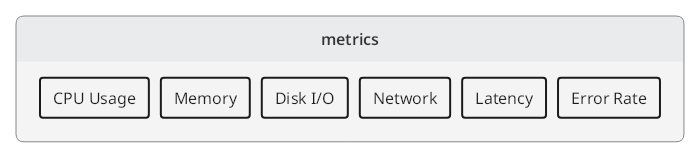
Preview unavailable in the current renderer. The source remains available to copy.
Short and Qualified Names
Inside a group, a short node name always identifies a local member. Another group may use the same name for a distinct node. At the root, use the short name when it is unique, or qualify it when duplicated. Root references never choose or change a group.
Two groups can each contain an api node without extra declarations:
TextGraph source
frontend {
  api -> browser
}
backend {
  api -> worker
}

frontend.api -> backend.api
frontend.api: Browser API
backend.api: Service API
Rendered diagram
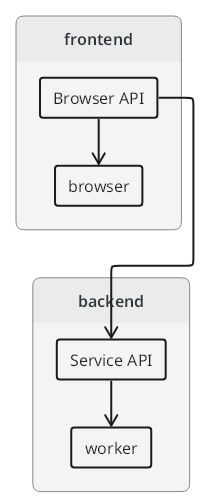
Preview unavailable in the current renderer. The source remains available to copy.
api alone is ambiguous at the root in this example; frontend.api and backend.api identify the two nodes. browser and worker are unique, so their short names remain sufficient. Qualified references also work for unique names. For nested nodes, include only enough trailing group names to make the path unique, such as backend.api instead of platform.backend.api.
Reversing the two group declarations produces the same nodes and membership. Root connections and decorations may precede the groups too. A grouped connection can explicitly reach another group with a qualified endpoint, such as browser -> backend.api; that reference does not move backend.api.