

TextGraph by Example
Read the source beside each diagram, then copy it into the Playground to try a change. For your first diagram, follow Getting Started. For the exact rules, see the Language Specification.
Labels and connections
Name things after connecting them
Connect nodes by their short names. Use separate lines to give them display labels. Use \n inside a label for a line break and : after an arrow's target for an edge caption.
TextGraph source
request -> save : write
request: API\nserver
save(stadium): Save\nrecord
Rendered diagram
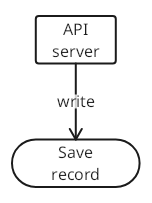
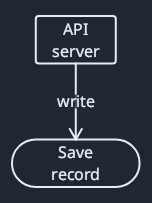
Preview unavailable in the current renderer. The source remains available to copy.
If you start with request:, the rest of the line becomes display text. Here the apparent arrow is part of one label, so no connection appears.
TextGraph source
request: API -> save: Store recordRendered diagram
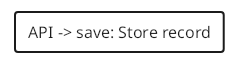

Preview unavailable in the current renderer. The source remains available to copy.
Caption the last edge or each edge
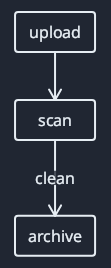
A caption at the end of a chain appears on its last edge.
TextGraph source
upload -> scan -> archive : cleanRendered diagram
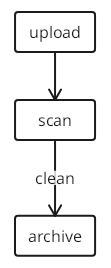
Preview unavailable in the current renderer. The source remains available to copy.
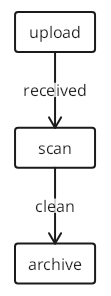
Write one connection per line when every edge needs a caption. An arrow after the caption on the same line would become part of the caption text.
TextGraph source
upload -> scan : received
scan -> archive : clean
Rendered diagram
Preview unavailable in the current renderer. The source remains available to copy.
Reuse a node with a name
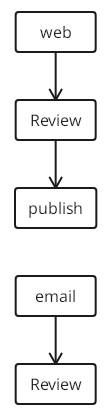
Each pair of square brackets creates a new node, even when its label matches another one. One occurrence in a chain is shared by the edges on either side of it.
TextGraph source
web -> [Review] -> publish
email -> [Review]
Rendered diagram
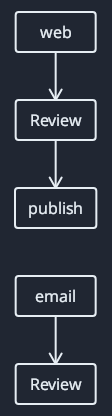
Preview unavailable in the current renderer. The source remains available to copy.
Use a named node when both paths should merge at the same step. Give it a display label once.
TextGraph source
web -> review -> publish
email -> review
review: Review
Rendered diagram
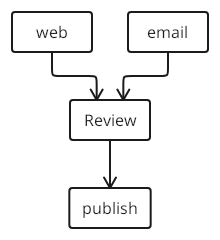
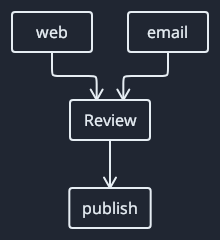
Preview unavailable in the current renderer. The source remains available to copy.
Groups and references
Give a group a title
The opening brace on the header line makes desk a group. The text between the colon and brace becomes the title. Both of these forms produce the same diagram.
TextGraph source
desk:Support desk{triage->reply}Rendered diagram
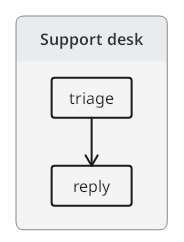
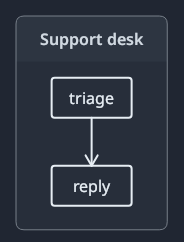
Preview unavailable in the current renderer. The source remains available to copy.
TextGraph source
desk: Support desk {
  triage -> reply
}
Rendered diagram
Preview unavailable in the current renderer. The source remains available to copy.
Move the opening brace to the next line and the first line labels a node. The following lines make a separate anonymous group.
TextGraph source
desk: Support desk
{ triage -> reply }
Rendered diagram
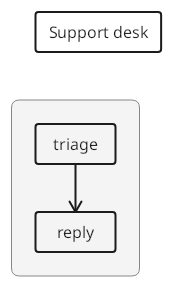
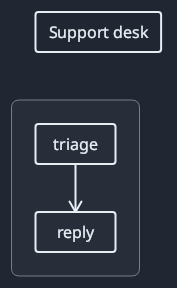
Preview unavailable in the current renderer. The source remains available to copy.
Connect to a group boundary
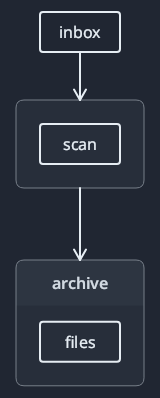
A group between two arrows is one endpoint shared by both arrows. The outer arrows attach to the group's boundary. Here an anonymous group sits between inbox and the named archive group.
TextGraph source
inbox -> { scan } -> archive: { files }Rendered diagram
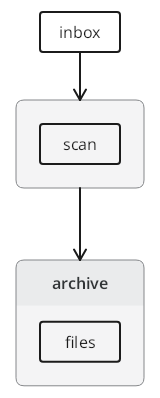
Preview unavailable in the current renderer. The source remains available to copy.
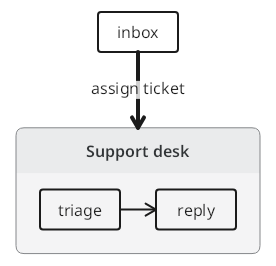
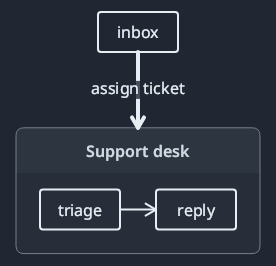
Set a group title before its opening brace and label the outer arrow after its closing brace. Each colon has a different job.
TextGraph source
inbox ->(bold) desk(horizontal): Support desk {
  triage -> reply
} : assign ticket
Rendered diagram
Preview unavailable in the current renderer. The source remains available to copy.
After a group closes, the colon introduces an edge caption. Another opening brace there causes an error. Write inbox -> { scan } : Template value instead.
inbox -> { scan } : {value}Label and connect members across groups
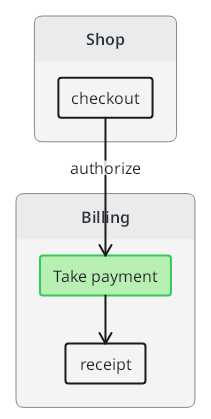
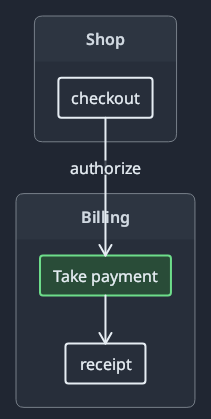
Write group membership and local connections inside braces. At the root, a short name reaches an existing member when it is unique. The connection and decoration below can come before the group definitions.
TextGraph source
checkout -> payment : authorize
payment(fill success): Take payment

Shop { checkout }
Billing { payment -> receipt }
Rendered diagram
Preview unavailable in the current renderer. The source remains available to copy.
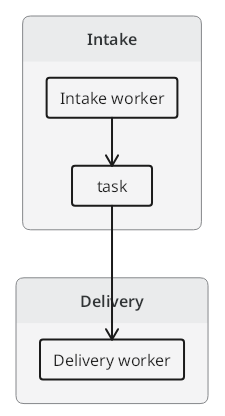
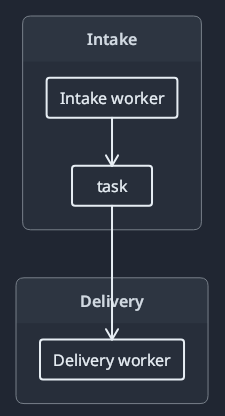
When two groups both have a worker, include the group name to distinguish them. Inside Intake, worker is local and Delivery.worker reaches the other group. The separate label lines keep both nodes in their groups.
TextGraph source
Intake {
  worker -> task
  task -> Delivery.worker
}
Delivery { worker }

Intake.worker: Intake worker
Delivery.worker: Delivery worker
Rendered diagram
Preview unavailable in the current renderer. The source remains available to copy.
At the root, worker alone is ambiguous here. Replace it with Intake.worker or Delivery.worker.
Intake { worker }
Delivery { worker }
worker -> done
For nested groups, use a unique trailing path such as Delivery.worker. A full path such as Platform.Delivery.worker also works. If two trailing paths match, add another group name. A matching complete path from the root takes priority.
Keep standalone member decorations at the root
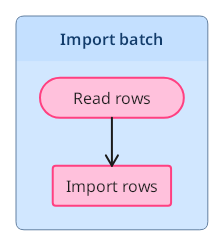
A group body can set styles on the endpoints of a connection. Put standalone member labels and shared styles outside the braces. Here reader, worker(fill info) styles both existing members.
TextGraph source
Batch(fill primary): Import batch {
  reader(stadium) -> worker
}
reader: Read rows
worker: Import rows
reader, worker(fill info)
Rendered diagram
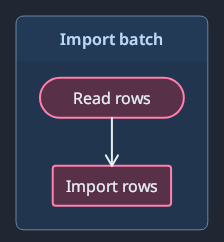
Preview unavailable in the current renderer. The source remains available to copy.
A standalone member label inside a group is an error. Move reader: Read rows to the root.
Batch { reader: Read rows }Styles and layout
Pick a shape to mark a role
Use a rectangle for a step, a diamond for a decision, and an ellipse or stadium for an entry or exit. A star or cloud can call out a special step or an external service. circle is an alias for ellipse, so its outline can stretch to fit the label.
TextGraph source
start(circle): Start processing
prepare: Read request
ready(diamond): Ready?
queue(stadium): Queue
priority(star): Priority
remote(cloud): Remote service
start -> prepare -> ready
ready -> queue : yes
ready -> priority : review
queue -> remote
Rendered diagram
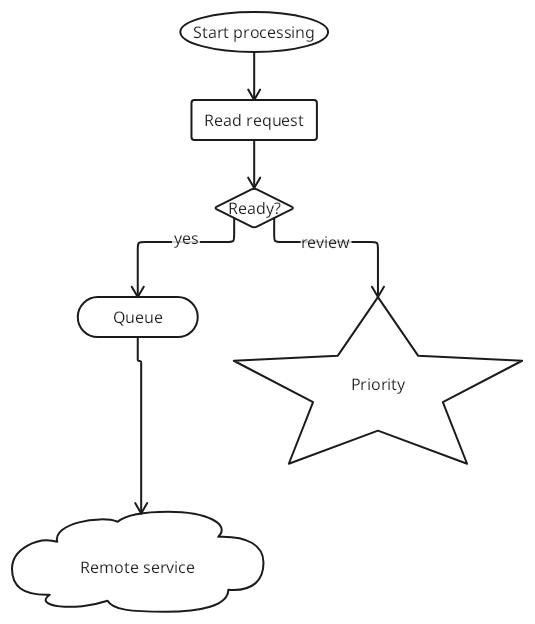
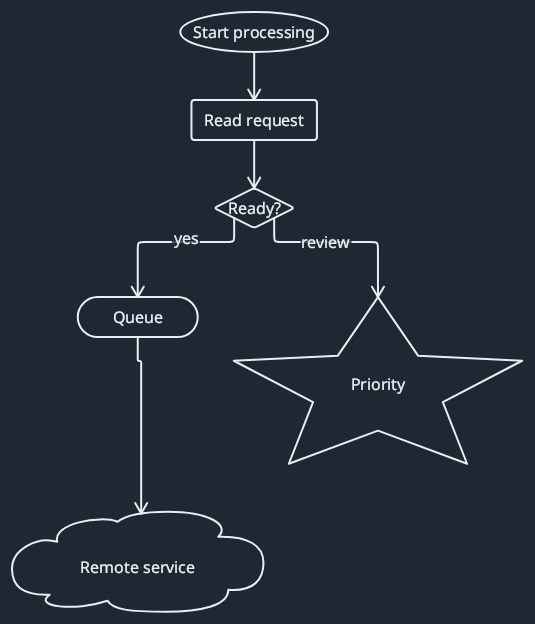
Preview unavailable in the current renderer. The source remains available to copy.
Compare outlines, fills, and line patterns
A color on its own changes the outline. Put fill before the color to match the interior to the outline. Putting the color first keeps that outline and fills the node with the primary color.
TextGraph source
(horizontal)
outline(success): Accent outline
filled(fill success): Matching fill
reversed(success fill): Primary interior
outline -> filled -> reversed
Rendered diagram


Preview unavailable in the current renderer. The source remains available to copy.
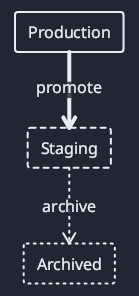
Parentheses after a node name style its border. Parentheses after an arrow style its line. This example uses a dashed border for staging, a dotted border for archived content, and a bold line for promotion.
TextGraph source
live ->(bold) stage : promote
stage ->(dotted) archived : archive
live: Production
stage(dashed): Staging
archived(dotted): Archived
Rendered diagram
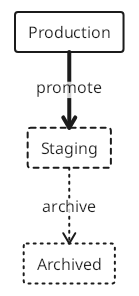
Preview unavailable in the current renderer. The source remains available to copy.
Put direction on the scope it belongs to
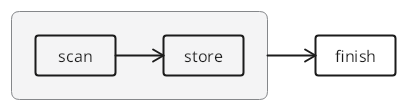
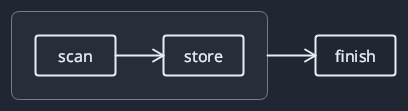
(horizontal){scan->store}->finish is equivalent to the two lines below. The class list belongs to the whole diagram, and the next statement introduces an anonymous group. The group uses automatic placement for its own contents.
TextGraph source
(horizontal)
{scan->store}->finish
Rendered diagram
Preview unavailable in the current renderer. The source remains available to copy.
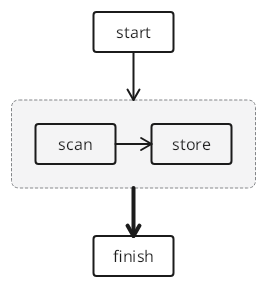
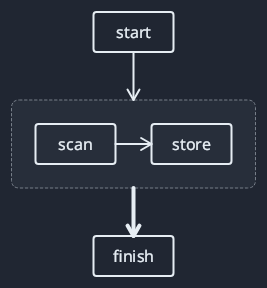
Set a class inside the braces to change the group's own appearance and direction. In this example the whole diagram flows down, the group flows across, and the arrow leaving the group is bold.
TextGraph source
(vertical)
start -> {
  (horizontal dashed)
  scan -> store
} ->(bold) finish
Rendered diagram
Preview unavailable in the current renderer. The source remains available to copy.
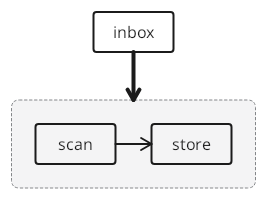
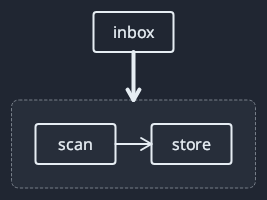
A group used as an endpoint can also take styles after the closing brace. The following placement puts bold on the arrow and horizontal dashed on the target group.
TextGraph source
inbox ->(bold) { scan -> store }(horizontal dashed)Rendered diagram
Preview unavailable in the current renderer. The source remains available to copy.
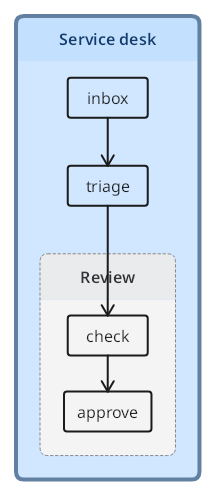
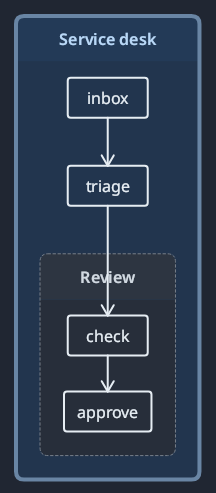
A header class list and a standalone list inside a group both style that group. A nested group owns its own classes. Here Desk gets the primary tint and bold border, and Review gets the dashed border.
TextGraph source
Desk(primary): Service desk {
  inbox -> triage
  Review {
    (vertical dashed)
    check -> approve
  }
  (fill bold)
}
triage -> check
Rendered diagram
Preview unavailable in the current renderer. The source remains available to copy.
Arrange a checklist in columns
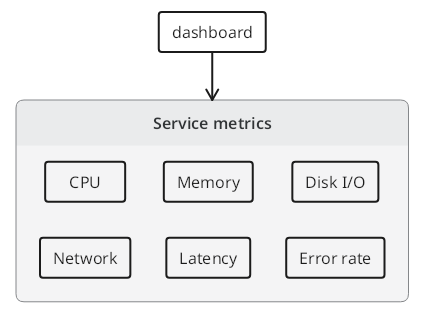
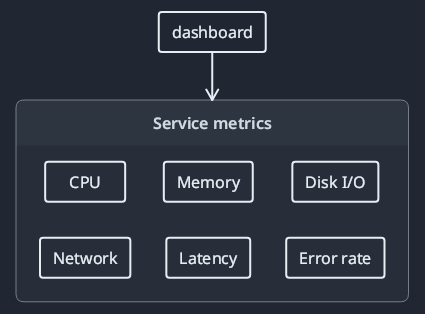
Use a column class on a group containing direct nodes. Connect the group to the rest of the diagram so the requested grid has a placement context. This group shows three columns with two rows.
TextGraph source
dashboard -> Metrics(layout-3-col): Service metrics {
  cpu
  memory
  disk
  network
  latency
  errors
}
cpu: CPU
memory: Memory
disk: Disk I/O
network: Network
latency: Latency
errors: Error rate
Rendered diagram
Preview unavailable in the current renderer. The source remains available to copy.
Number parent steps and child steps
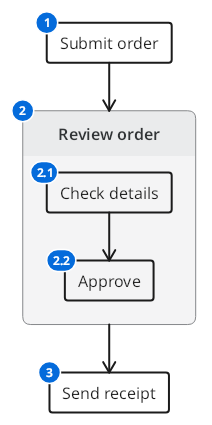
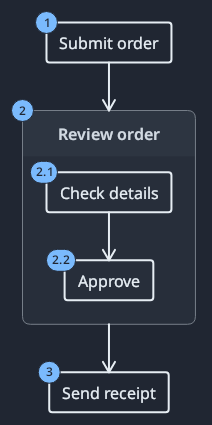
A root (autonumber) numbers start, Review and finish as 1, 2 and 3. Enabling it in Review as well gives its child steps 2.1 and 2.2. A repeated reference keeps the original number.
TextGraph source
(autonumber)
start -> Review(autonumber): Review order {
  check -> approve
} -> finish
start: Submit order
check: Check details
approve: Approve
finish: Send receipt
Rendered diagram
Preview unavailable in the current renderer. The source remains available to copy.
Complete workflows
Review an expense claim
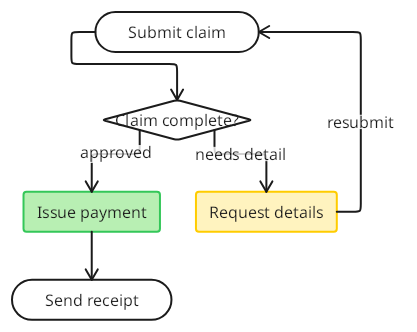
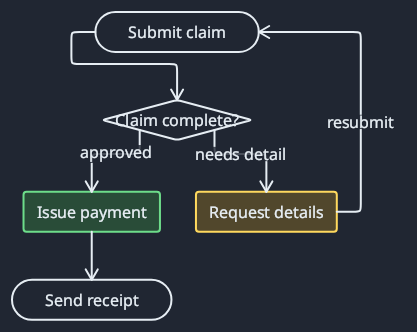
Use a diamond for the decision and a caption for each outcome. The request for details loops back to the original submission step.
TextGraph source
submit -> check
check -> reimburse : approved
check -> request : needs detail
request -> submit : resubmit
reimburse -> notify

submit(stadium): Submit claim
check(diamond): Claim complete?
reimburse(fill success): Issue payment
request(fill warning): Request details
notify(stadium): Send receipt
Rendered diagram
Preview unavailable in the current renderer. The source remains available to copy.
Trace an incident across teams
Group steps by owner. Link existing members at the root and show the handoff differently from the work inside each team.
TextGraph source
(horizontal)
Support(fill info): Support {
  report -> triage
}
Engineering(fill primary): Engineering {
  investigate -> resolve
}

triage ->(bold) investigate : hand off
resolve ->(dashed) notify : post update
report: Receive report
triage: Confirm impact
investigate: Find cause
resolve(fill success): Deploy fix
notify(stadium): Notify customers
Rendered diagram


Preview unavailable in the current renderer. The source remains available to copy.